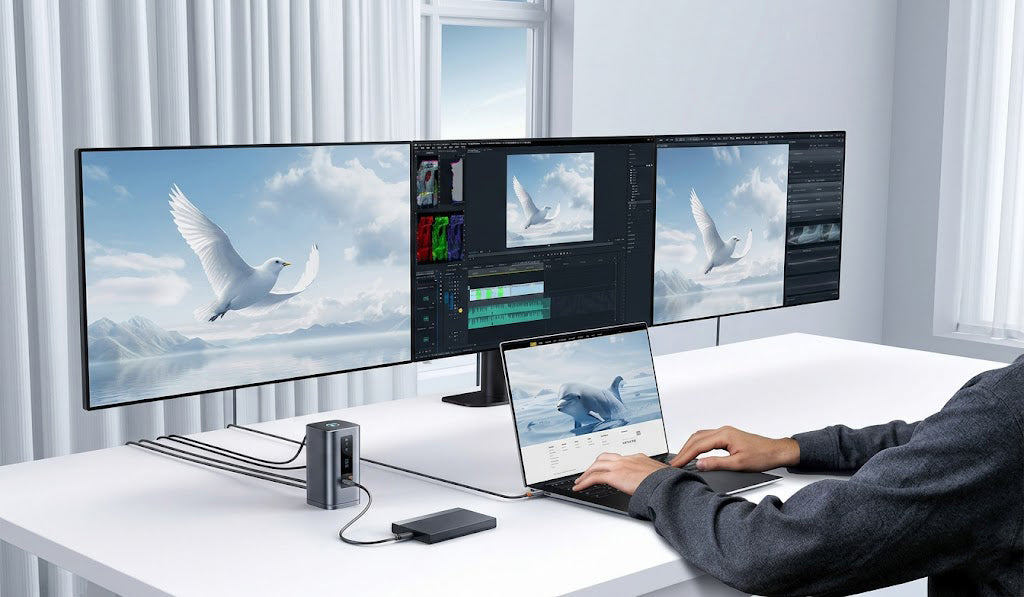



Most accessory companies sell you shiny plastic trash. You spend two thousand dollars on a premium computer. Then you plug a cheap fragile rectangle into the side of it.
Suddenly your beautiful clean workspace looks terrible. It looks like a mechanical octopus died on your table.
We need to talk about the hidden flaws of flat hubs. The industry is obsessed with them. It is time to demand better engineering.
The Hidden Flaws of Flat Hubs
Manufacturers love stuffing eleven high speed ports into tiny plastic slabs. They look great in marketing renders.
But in the real world they fail miserably.
When you push 4K video and gigabits of data through a tiny sealed box it gets incredibly hot. Heat destroys electronics. Your system panics.
You start experiencing USB C dock overheating problems. Your file transfers slow down to a crawl. Your external screens flicker. Furthermore you get a massive rat nest of wires pointing in every single direction.
It ruins any attempt at proper desk cable management.
The Thermal Dynamics of a Tower Design
Let us discuss how to actually fix this. We need to look at the thermal dynamics of a tower design.
Basic physics dictates that heat rises. If you lay a hot circuit board flat on a wooden desk the heat has nowhere to go. It reflects back into the device itself.
A vertical laptop docking station changes the equation completely.
Consider the Baseus Spacemate 11 in 1. It uses an upright aluminum alloy chassis. This is not just for aesthetics. It is a highly functional heatsink.
By standing tall it utilizes natural convection. Cold air pulls from the bottom and hot air escapes from the top. The aluminum shell acts as a massive thermal dissipator.
You can max out the 10Gbps data ports. You can run a heavy multi monitor setup. The dock stays incredibly cool. You get maximum performance without the dreaded thermal lag.
Defeating Cable Drag with Nano Adhesives
Now we must address the most annoying problem in modern workspaces. I call it cable drag.
Cables are surprisingly heavy. When you plug two display cables a thick ethernet cord and multiple power cables into a lightweight hub physics takes over.
The hub lifts off the desk. It twists sideways. It dangles dangerously off the edge of your table. It is absolutely infuriating.
Creating the best laptop docking station 2026 demands a real solution to this weight issue.
Baseus actually solved it. They engineered a detachable magnetic base for the Spacemate. But they went one brilliant step further. The bottom of the base features a specialized nano adhesive pad.
You stick the base exactly where you want it on your desk. It anchors the dock completely.
You can plug in the heaviest stiffest cords available. The Spacemate stays firmly planted.
When you need to take the main unit to a meeting you just pull it off the magnetic base. Your cables stay organized on your desk. Your desk cable management remains absolutely perfect.
Hardware Level Privacy
Let us talk about privacy.
We all have embarrassing moments on video calls. You share your screen. You accidentally show a confidential company document. You frantically try to find the stop sharing button with your mouse.
Software shortcuts are unreliable. You fumble. You panic.
A true docking station with screen lock fixes this permanently.
The Spacemate features a dedicated physical button right on top. You press it once. Boom. Your external displays go dark immediately.
It cuts the video feed at the hardware level. The host computer completely stops transmitting the signal.
When your sensitive conversation is over you press it again. Your screens come back instantly.
This is brilliant engineering. It gives you absolute physical control over your digital environment. I genuinely wish every hardware manufacturer did this.
Status at a Glance
Finally we need to address troubleshooting.
When a monitor goes black on a standard cheap hub you have to guess. Is it the cable? Is it the computer port? Is the hub entirely dead?
You waste twenty minutes plugging and unplugging things in pure frustration.
The Spacemate includes a front facing LED panel. This is not a useless cosmetic light strip. It actively displays port status.
If your mouse is connected the USB indicator lights up. If your video is active the display icon glows brightly.
You know exactly what is working at a simple glance. It removes the guesswork entirely.
Conclusion
I rarely praise accessories. I am usually pointing out their massive lazy design flaws.
But a vertical laptop docking station actually makes sense. It respects thermal physics. It respects your limited desk space. It gives you tangible hardware features that improve your daily grind.
Stop buying cheap flat plastic hubs that melt under pressure. Invest in proper desk architecture.
Ready to stop fighting with cables and overheating plastic? See the engineering for yourself.
Explore our complete range of premium workspace solutions.
Frequently Asked Questions
Does a vertical laptop docking station really save space?
Yes it absolutely does. It reduces the physical footprint on your desk dramatically. This clears up room for your coffee cup or your notebook. It instantly improves your multi monitor setup cable management by keeping wires routed vertically.
How does the docking station with screen lock function?
It uses a physical hardware button engineered directly into the device. Pressing it immediately cuts the video signal from the host machine to your external displays. You do not need to install any extra software or drivers for it to work.
Will the Baseus Spacemate 11 in 1 work with any laptop?
It works beautifully with modern Windows devices. It requires a full function USB C port to utilize all eleven features properly. Always check your computer specifications to ensure your port supports video output and power delivery before buying.